
Save, undo and leave
Save a template, name it, undo mistakes and leave the designer without losing work.
Your changes live in the designer until you save them. Learn how to save, how far undo reaches, and what the designer asks when you try to leave.
Name the template
Open the name
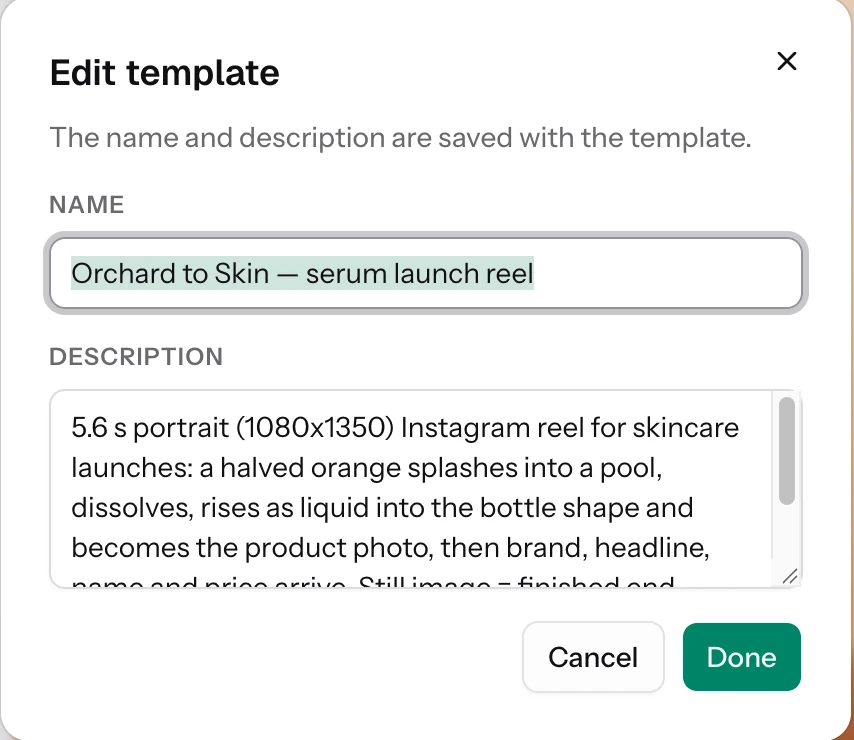
Choose the template name, or the pencil beside it, at the top of the left panel. The Edit template window opens.
Fill in Name and Description
Type a Name and, if you like, a Description. Choose Done. The window says the name and description are saved with the template, so they are saved when you save the template, not before.
Save
Choose Save Template at the top of the right panel, or press Cmd/Ctrl+S. A spinner shows while it saves and you see "Template saved".
- It saves the name, the description, every page and every flow.
- The button is disabled until at least one page has a layer. Hover it and it says "Add a layer to save this design".
- The first save creates the template in your workspace. After that, each save updates it.
- On save, Kalpana finds the text and image layers again and keeps the settings of any variables that already existed. See Choose what changes per row.
- After a save, the designer takes a picture of each saved page whose content changed, at the still moment for an animated page, and uploads it as the page's preview. Template cards and the template page show these pictures. They upload from your browser, so they can take a few seconds to appear.
New Batch sits beside Save Template on a saved template. If you have unsaved edits it asks "Save changes before creating a batch?" with Keep editing, Discard changes and Save and continue.
Undo and redo
| Action | Shortcut |
|---|---|
| Undo | Cmd/Ctrl+Z, or Undo at the top left of the canvas |
| Redo | Cmd/Ctrl+Shift+Z or Cmd/Ctrl+Y, or Redo |
- Undo remembers the last 100 steps, and runs of small edits count as one.
- It covers layers, animations, the length of the timeline, the still moment and morphs.
- Switching to another page clears undo, so finish an edit before you move on. Your work on the other page is kept.
- Flows has its own undo history, with the same keys.
Leave
If you have unsaved changes and you go to another part of the app, you see Leave without saving? Choose Keep editing to stay, or Discard changes to go. If you reload or close the tab, your browser shows its own prompt instead.
The message says the design "hasn't been saved as a template yet", even when you saved it earlier. Discard changes loses only the edits made since your last save.
Try it
Open a new template and draw a rectangle with R. Press Cmd/Ctrl+Z to undo it and Cmd/Ctrl+Shift+Z to bring it back. Name the template "Sale card" in Edit template, then choose Save Template. Try to go back with some edits unsaved to see the Leave without saving? window.
Next
Updated 4 Nov 2026