
Fixed, Hug and Fill
Decide whether a layer keeps its size, shrinks around its content or stretches to the space it is given.
These settings decide what happens to a layer's size when its content or its parent changes. They are what lets a badge grow with a longer word, or a title use the full width of its column.
Set Resizing
Find the row
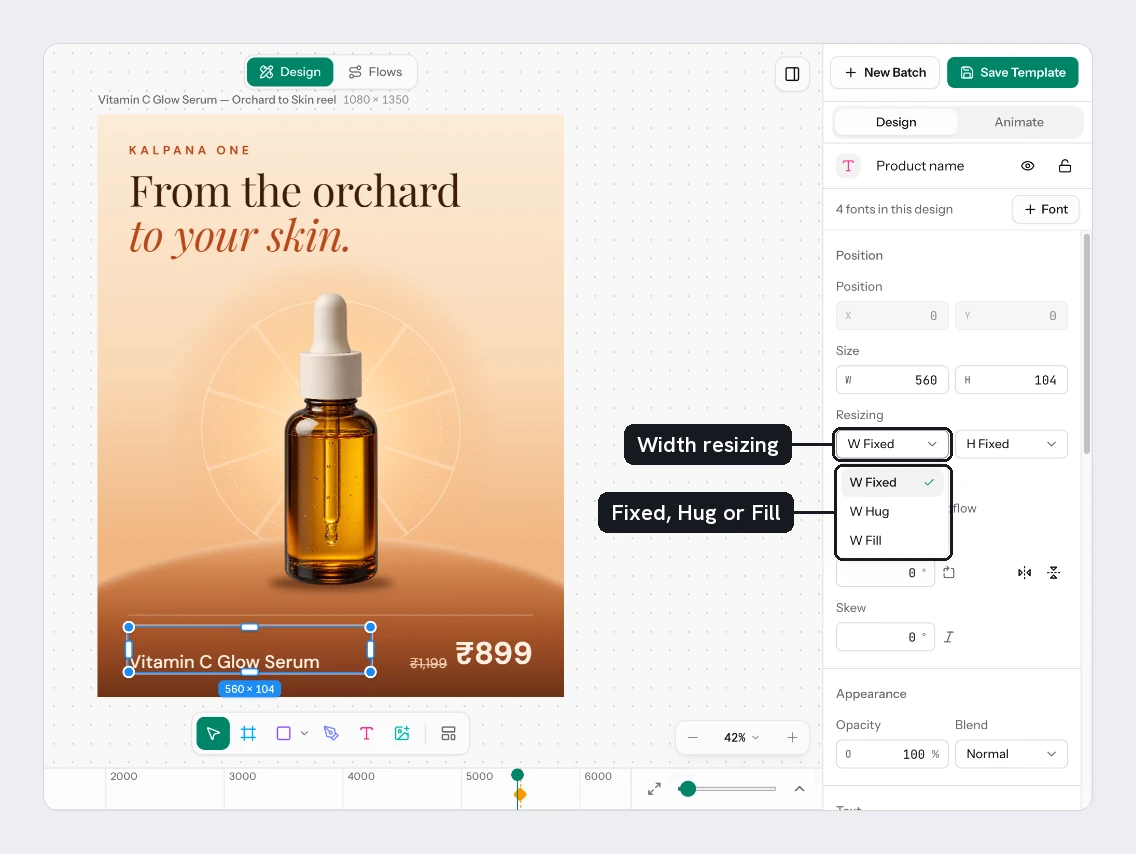
Select a layer inside a frame that has a layout flow, or a frame that has a layout flow itself. In Position, the Resizing row shows two lists.
Choose for each axis
The first list is horizontal and reads W Fixed, W Hug or W Fill. The second is vertical and reads H Fixed, H Hug or H Fill. You set each axis on its own.
What each choice does
| Choice | Result |
|---|---|
| Fixed | The layer keeps the size you type in W and H. |
| Hug | The layer shrinks or grows around its content. A frame wraps its layers and padding. A text layer wraps its words. W or H is greyed out. |
| Fill | The layer takes the space its parent gives it. Several Fill layers in one row or column share the spare room. |
A frame that is not inside another layout flow offers Fixed and Hug only. Fill needs a parent with a layout flow.
Fill has nothing to fill inside a parent that is set to Hug on the same axis. Set the parent to Fixed if the child should stretch.
For a text layer, Resizing and Box are one setting seen two ways. Hug on both axes is the same as a Hug box. A Fill width gives a box that wraps within its column. See Fit text in its box.
Try it
Make a badge that grows with its words:
- Select Badge. If you made its Box Fixed earlier, set it back to Hug. Then press
Shift+A. The text is wrapped in a frame with a layout flow, and the frame hugs it. - In Layout flow, set the first Padding field (left and right) to
24and the second (top and bottom) to12. - In Fill, choose Add fill (+) and give the frame a colour. A new frame has no fill.
- Select the text in Layers, press
Enterand type a longer phrase, such asOnly a few left. The coloured shape grows with it. Put the original words back afterwards.
You should see the badge shape stretch for the longer copy and shrink again for the short one.
Next
Updated 4 Nov 2026