
Fonts and styling
Choose a brand font, then set its weight, size, spacing, case and alignment.
Select a text layer and the Text section of the Design panel holds its type settings. While you are typing, they change only the words you selected.
Choose a font
Add the font to the design
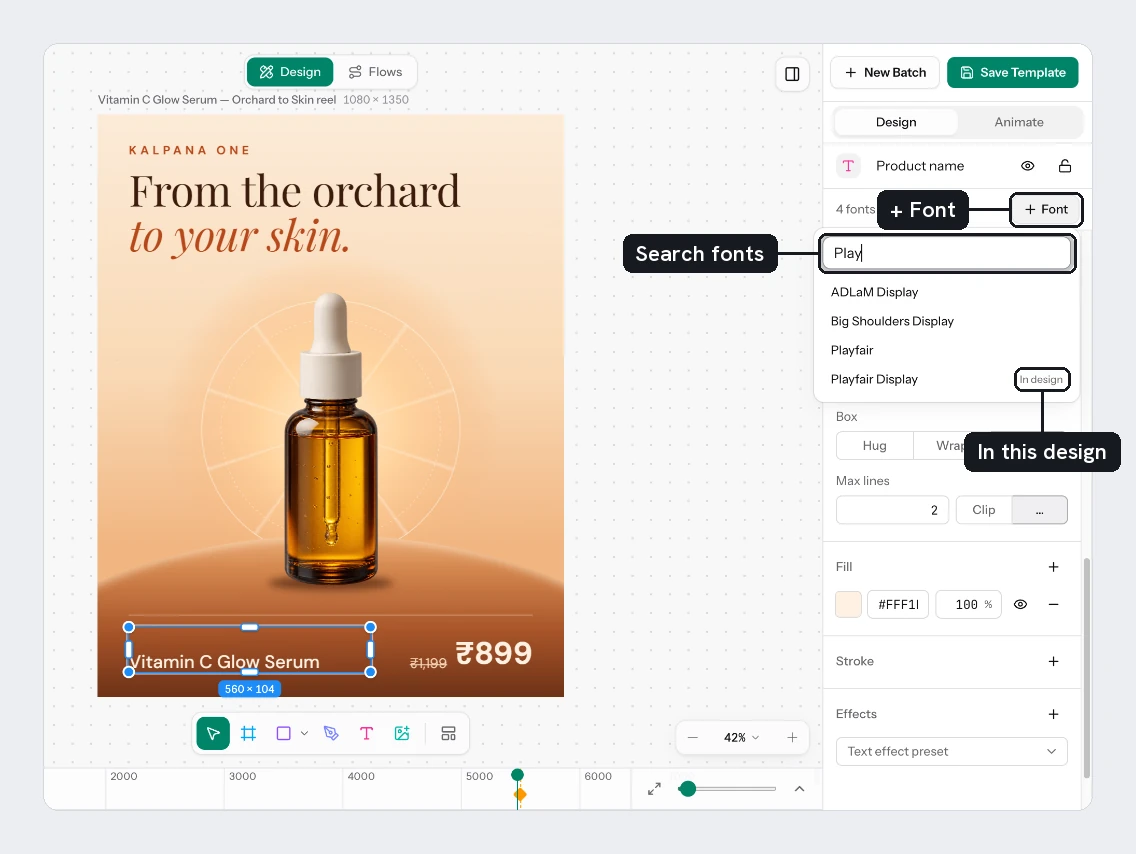
Above the panel, a line says how many fonts are in this design. Choose + Font, type in Search fonts, and click a family. The selected text switches to it. Families already used show In design.
The list holds Kalpana's font library and the fonts your workspace has uploaded. To add your brand fonts, see Fonts.
Pick the family and style
Use Font to choose from the fonts in the design. Style lists that family's weights and italics, such as Regular or Bold. The Aa field next to it sets the size.
Spacing, case and lines
| Control | What it does |
|---|---|
| Spacing, line height (the up-down arrow) | Auto, a percentage such as 120%, or a size in px |
| Spacing, letter spacing (the left-right arrow) | A percentage such as 2%, or a size in px |
| Case | As typed, Uppercase (AB), Lowercase (ab) or Title case (Ab) |
| Underline and Strikethrough | Two buttons that switch on and off on their own |
When the selected words differ in a setting, its field reads Mixed.
Align
Align has two groups. The first sets the horizontal alignment: Align left, Align centre, Align right or Justify. The second sets the vertical alignment inside the box: Align top, Align middle or Align bottom. Vertical alignment only makes a difference when the box is taller than the text, so it matters for fixed boxes.
If a template uses a font your workspace does not have, Create batch asks you to sync or upload it first. See Fonts.
Try it
Style the four sale card layers:
- Title: a bold Style, size
64. - Price: a bold Style, size
56. - Was Price: size
32, with Strikethrough switched on. - Badge: Uppercase, letter spacing
4%, Align centre.
You should see the price larger than the crossed-out price, and the badge in capitals.
Next
- Fit text in its box
- Text effect presets
- Fills for text colour
Updated 4 Nov 2026