
Animate a layer
Add a ready-made entrance or exit to a layer and see it on the timeline.
Reach for a preset when a layer should arrive or leave: a badge that pops in, a price that rises. Presets are the quickest way to add motion, and every row of a batch gets the same animation.
Add a preset
Select one layer
Click a layer on the canvas or in the Layers panel. With nothing selected the tab says "Select a layer to animate it", and with several selected it asks for one. The artboard itself cannot be animated.
Open the Animate tab
In the right panel, switch from Design to Animate.
Choose Add
Under Animations, choose Add. The menu has Presets and Primitives, plus Text reveal on text layers. Point at a name to open its list.
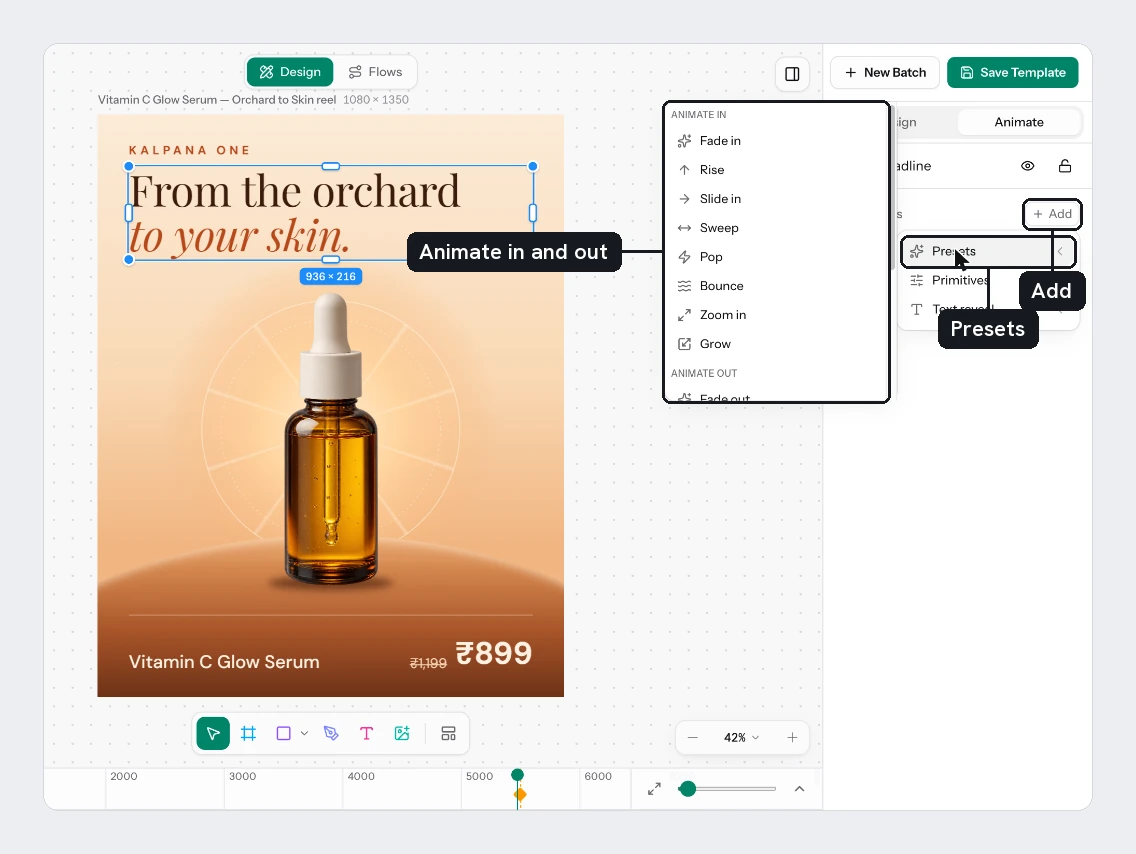
Pick a preset
Choose one under Animate in or Animate out. The timeline opens under the canvas and shows the new animation.
The presets
| Animate in | Animate out | What it does |
|---|---|---|
| Fade in | Fade out | Opacity only |
| Rise | Sink | Moves up (or down) while fading |
| Slide in | Slide out | Slides sideways while fading |
| Sweep | Sweep out | A longer slide |
| Pop | Pop out | Grows past full size, then settles |
| Bounce | Bounce out | Drops in and bounces, each hop smaller |
| Zoom in | Zoom out | Settles from slightly too large |
| Grow | Shrink | Settles from slightly small |
Each preset lasts half a second.
When it plays
An Animate in preset starts where the playhead is when you add it. Move the playhead first to start later. An Animate out preset plays in the last half second of the page, so set the page's length first. See The timeline.
Adjust or remove it
A preset appears under Primitives as one row per property it moves, such as Position Y and Opacity. Click a row to change its timing, keyframes and easing. The eye (Hide animation) mutes a row and the bin (Remove animation) deletes it.
A preset replaces any animation already on the properties it moves. Adding Fade out after Fade in leaves only the fade out, because both use Opacity. To animate one property in and out, add keyframes to its row. See Keyframes and easing.
Try it
On the sale card, select Badge and add Pop from Animate in. Select Price and add Rise. Tap Space to play. Both animations run for every row you fill later.
Next
- Text reveal animates a title word by word.
- The timeline shows every animation over time.
- Motion templates lists the output formats and credit costs.
Updated 4 Nov 2026