
Credits and Usage
See credit balances, credit lots, and how each workspace uses render and AI credits.
Organization → Credits & usage shows how the organization's credits are being spent.
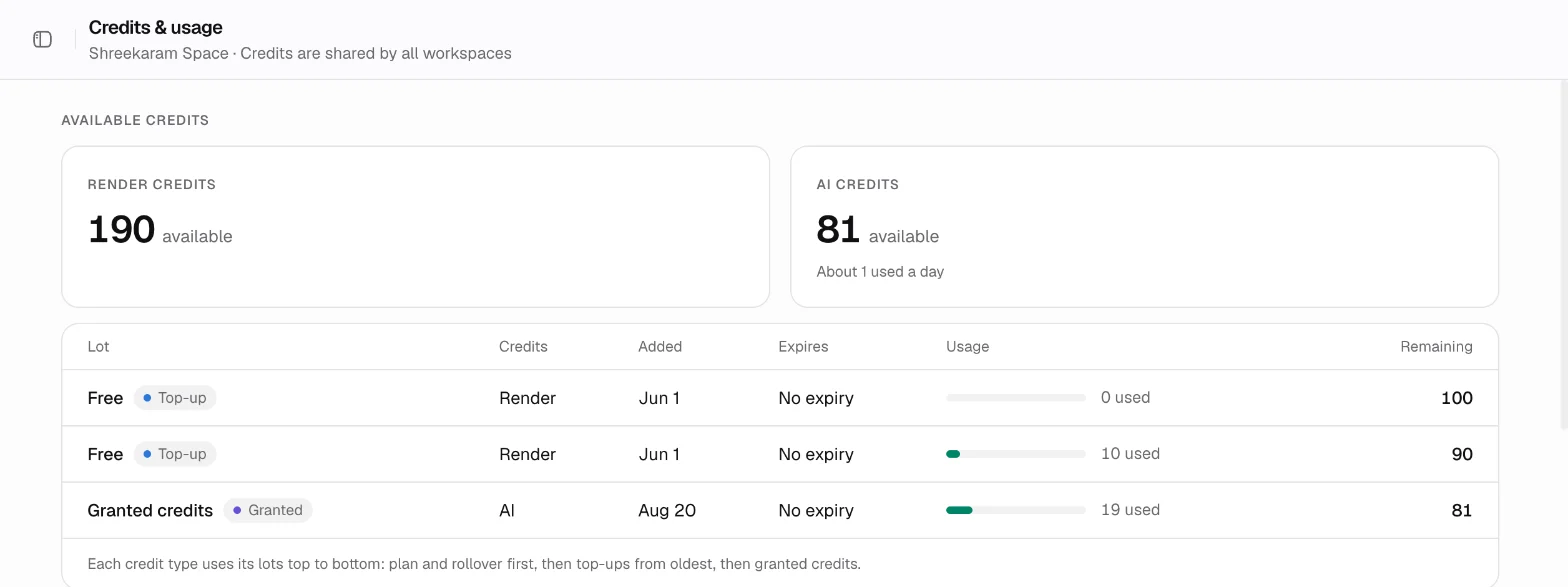
Available credits
Cards show the Render credits and AI credits available across all lots. The workspace sidebar also shows the credits remaining.
The lots table lists each block of credits: where it came from (plan, rollover, top-up or granted), the credit type, when it was added, when it expires, how much has been used and how much is left. Lots that are used up or expired move to their own section.
Usage
Pick a date range of up to 31 days, or use Today, Last 7 Days or Last 30 Days. For that range you see:
- Creatives made, split into images and videos.
- Render credits used, by workspace.
- AI credits used, by edit type.
- A table of every workspace with its members, creatives, render credits, AI credits and storage. Storage is the current total, not limited to the date range.
Each workspace's Home page shows the same figures for that workspace alone, plus a breakdown by file format. In Render credits by format, credits spent on designer calls from a connected AI assistant show as Design.
Updated 1 Nov 2026