
Designer Agent
Describe a creative to Claude, ChatGPT or another AI assistant and get an editable Kalpana template in your brand, in every size you need.
The fastest way to a template is to ask for one. Kalpana Designer connects your AI assistant to Kalpana's design tools: describe the post, ad or banner you want, and the assistant builds it in your workspace with layers, your brand fonts and images, a page for every size you ask for, and motion. It checks its own layout and previews before it saves.
The result is an ordinary Kalpana template you can open, edit and fill with data like any other.
Try asking
- "Design a square sale post for our emerald saree with the photos in our Festive collection."
- "Add a story page and a 1200 × 628 link ad page to that template."
- "Animate the headline word by word."
- "Join these pages into a 15-second video with a flow."
Connect your assistant
Works with Claude, ChatGPT, Cursor, Codex and other assistants that support MCP.
Open AI Agent setup
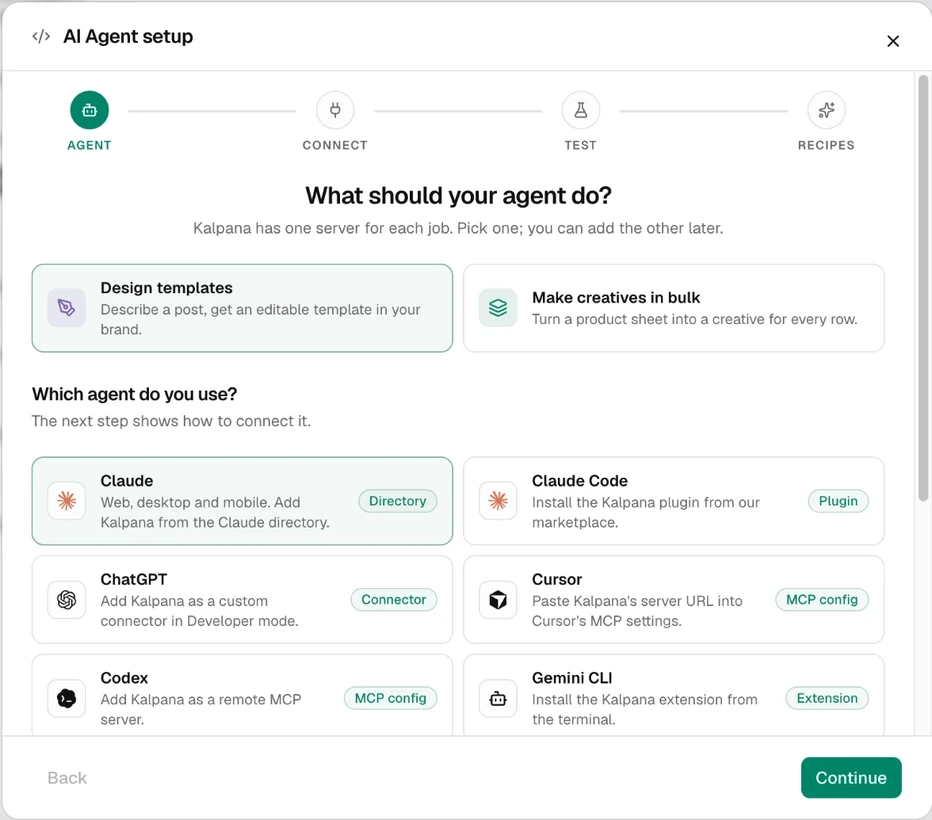
In the Studio, open AI Agent setup in the sidebar. Under What should your agent do?, pick Design templates.
Pick your assistant
Under Which agent do you use?, choose your app and choose Continue. The Connect step shows that app's steps. In Claude, the quickest way is the Claude directory listing Kalpana Designer.
Sign in and approve
Your assistant opens Kalpana. Choose the workspace to share and approve what the agent may do. Each connection covers one workspace.
Test it and give it a first job
The Test step has a read-only prompt to copy into your assistant, so you can check it reaches Kalpana before it changes anything. Recipes then offers a few first jobs, each with a prompt written for it.
Full setup for every client, including config files and the server URL, is in Clients.
What it costs
Kalpana Designer works on every plan. Calls that make or draw a design are paid from the workspace's render credits: one credit covers 20 calls. Reading, checking, copying pages, undo and flows are free. See Designer MCP.
After the agent is done
The template is saved in your workspace under My Templates. Open it to adjust anything by hand and check its variables. To make creatives from it, create a batch or ask the Batch Agent.
The agent's tools and limits are listed in Designer MCP and Designer tools. To see or remove an assistant's access, open Settings → Connected assistants.
Updated 4 Nov 2026