
Output Formats
Choose the file type of each row, from PNG to MP4, and see how size and credits work.
Every row of a batch becomes one file, and you choose its type. A batch can mix types, so one sheet can give you a PNG for the feed and an MP4 for stories.
Choose a format
In the batch builder, the Format column of the row grid shows each row's format, such as PNG. Click it to open the menu, which has an Image group and, for animated templates, a Video group.
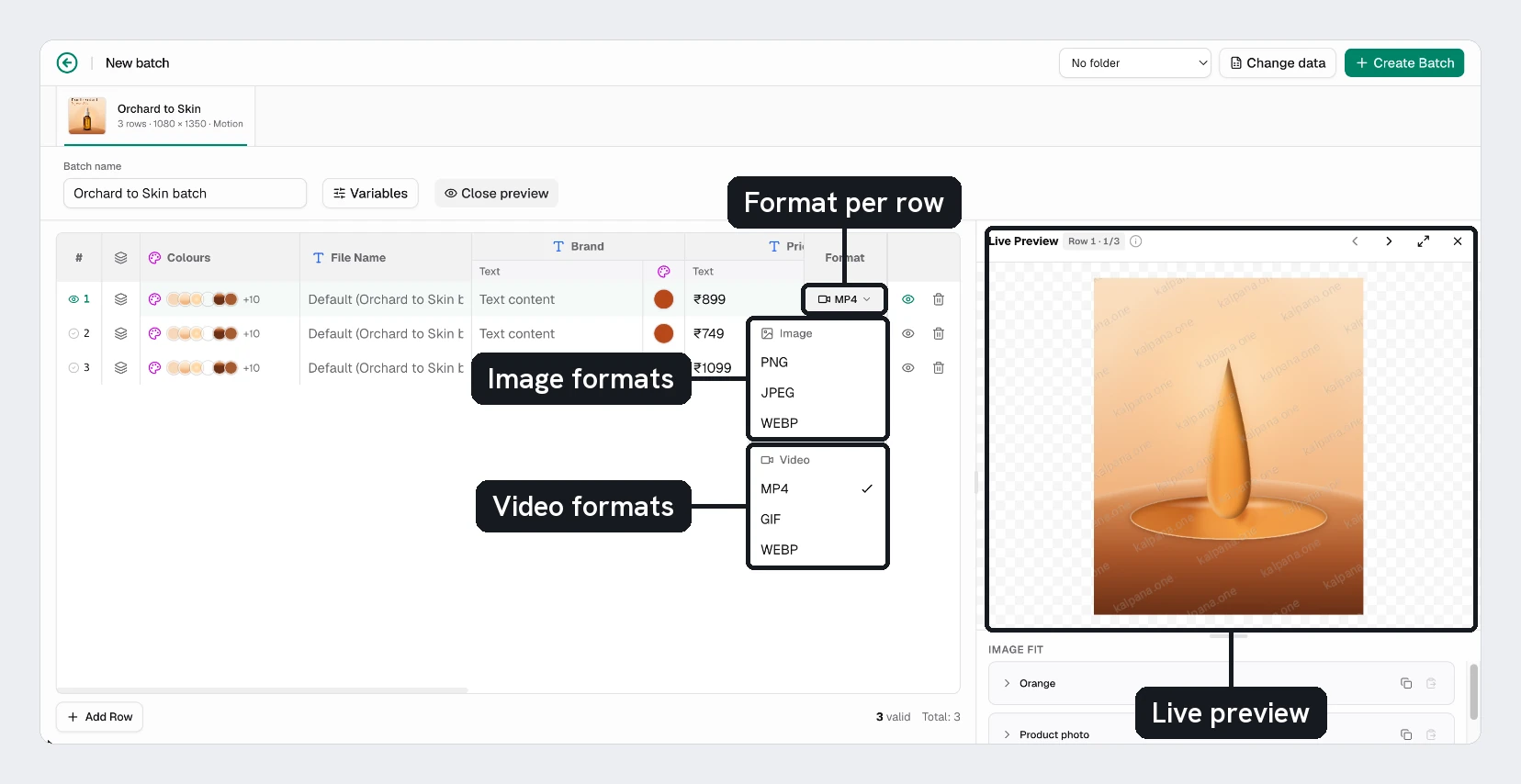
| Group | Formats | Good for |
|---|---|---|
| Image | PNG, JPEG, WebP | Social posts, ads and web images |
| Video | MP4 | Video ads and stories |
| Video | GIF | Short loops where video is not supported |
| Video | WebP | An animated WebP loop |
Rows of a static template start as PNG, and rows of an animated template start as MP4. Choosing a video format for a row switches that row to a video job. Static templates only offer the image formats, because they have no motion to render, and a flow only offers the video formats. See Motion templates.
WebP appears in both groups. Under Image it is a single frame. Under Video it is an animation.
Editing a single job in a finished batch, for example with Duplicate, offers the same Output and Format choices.
Size and quality
A file has the size of its page, in pixels. A 1080 × 1350 page gives a 1080 × 1350 image or video. The Studio has no separate scale or quality setting for batches, so to get a larger file, make the page larger in the designer. See Designer.
Videos use the frame rate and length of the template's animation. A template without frame-rate information renders at 30 frames per second.
Templates with several pages
A template can hold several pages, such as a square post, a story and a banner. Every row renders once for each page you keep in the batch, and each file has the size of its own page. Kalpana adds the page name to the file name, for example SKU-2101_story-1080-1920. See Preview rows.
The format is set per row, so a page of a multi-page template can be a PNG while another is a video.
Animated templates as an image
When a motion template is rendered as an image, the file shows one moment of the animation, the page's still moment. Set it in the designer on the timeline: move the playhead to where all the content is in place and choose Use this moment for still images in the timeline toolbar, or drag the amber diamond in the ruler. See Set the still moment. The row previews in the batch builder show the same moment, so you see what the image will look like before you run.
Kalpana picks the moment in this order:
- A moment chosen for that batch. Only an AI assistant can set one, through the
stillTimeoption of the MCP server. Batches made in the Studio do not carry one. - The page's still moment, set on the timeline in the designer or by an assistant through the designer MCP.
- The last frame, where the motion has settled.
If the last frame is an outro or a loop point and looks wrong, set a still moment on the page, or render the row as a video instead.
Credits
Each job is priced when the batch is created and again if you edit it. Credits are taken only when a job renders successfully.
| Output | Credits |
|---|---|
| Any image | 1 |
| Any video | Its length in seconds, at most 60, multiplied by its size relative to 1920 × 1080 when larger, rounded up, minimum 1 |
The format does not change the price: MP4, GIF and WebP cost the same for the same length and size.
| Video | Credits |
|---|---|
| 5 seconds at 1080 × 1080 | 5 |
| 10 seconds at 1920 × 1080 | 10 |
| 5 seconds at 3840 × 2160 | 20 |
| 6 seconds at 2160 × 2160 | 14 |
Videos smaller than 1920 × 1080 are not discounted, so a vertical 1080 × 1920 video costs the same per second as a 1920 × 1080 one. The length is the template's animation length unless the job carries its own.
When you choose Run on a published batch, the confirmation shows Required Credits, split into images and videos, before anything renders. See Run and download and Plans and credits.
For a mixed batch, try one row of each format first. The preview is watermarked, but the finished files are not, and a short test run shows how long videos take and what they cost.
Updated 4 Nov 2026