
Integrations
Connect spreadsheets and cloud storage to a workspace, and see what each connection is used for.
Integrations connects outside tools to the current workspace. Each workspace keeps its own connections.
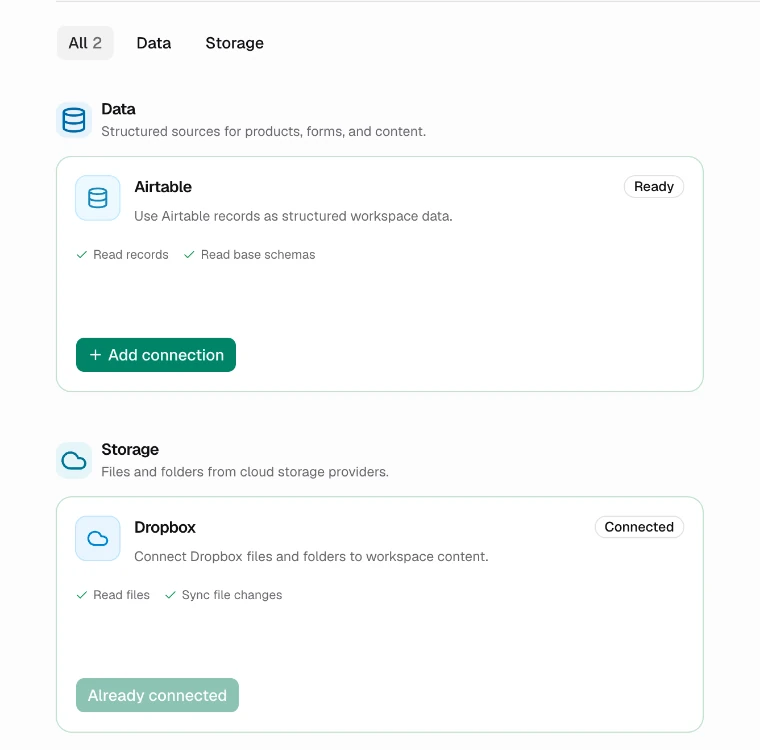
Providers
The Providers tab is a catalogue you can search or filter by category. Each card lists what the connection is allowed to do. Choose Add connection and sign in to the provider to connect it. Airtable can also connect with a personal access token.
Airtable
Data. Connect a base and export a view as CSV for a batch.
Shopify
Commerce. Products from a CSV export, creatives back to the store through Zapier.
Google Drive
Storage. Save creatives to Drive through Zapier.
Dropbox
Storage. Import images and save creatives to a Dropbox folder.
CSV and Excel
No connection needed. Upload a CSV or paste cells from Excel, Google Sheets or Numbers.
Storage connections add an Import menu to All Images and enable Save to storage in Creatives. See Images and Creatives.
AI assistants, Figma and code
These are not workspace integrations, but they connect Kalpana to the tools where you design and work.
Figma plugin
Export a Figma frame as a template or as a page of one.
AI assistants (MCP)
Let Claude and other assistants find templates and create batches.
TypeScript SDK
Run templates and batches from your own code with an API key.
CLI
Render one creative or a batch from a CSV in your terminal or CI.
Connections
The Connections tab lists the workspace's connected accounts with their status:
| Status | Meaning |
|---|---|
| Active | Working and available |
| Connecting | Sign-in is still in progress |
| Disabled | Turned off in Kalpana |
| Needs attention or Expired | Reconnect the account |
| Revoked | Access was withdrawn at the provider |
The switch on each connection makes it available or unavailable to workflows without deleting it. The bin deletes it. Disable a connection instead if you may need it again.
Who can manage integrations
Only workspace Owners can add, change or delete connections. Managers and Designers can use existing connections, and every role can see them. See Members and roles.
The Figma plugin and AI assistants are not workspace integrations. They are connected to your account and listed under Connected assistants.
Updated 9 Nov 2026